8BitDo controllers are now officially supported by Apple devices, including iPhone, iPad, and Apple TV. I tested them on all three platforms in my latest video.
This compatibility eliminates the need for complicated workarounds to pair these controllers with iOS devices. Compatible controllers include the SN30 Pro, SN30 Pro Plus, Pro 2, the 8BitDo Ultimate Controller, and Light SE. 8bitdo has a compatibility page here for more information. Users may need to update their controller’s firmware first – even if they just purchased it recently.
The controllers can be connected via USB-C on iPads with a USB-C port, but iPhones or iPads with a Lightning connector must use Bluetooth connections. I found that they work just like Xbox and Playstation controllers once connected.
The 8-Bitdo controllers can be used with various games, including those on Apple Arcade, as well as game streaming services like Xbox Cloud Gaming. Users can remap controls and set up different profiles for their controllers using iOS settings or the 8-Bitdo Ultimate app, which allows for further customization on their more premium controllers like the Ultimate and Pro 2 controllers.
This new feature closes a big compatibility gap these controllers had since the beginning. Now if only we can get them working with Xbox and PS4/5 Consoles next!
The Dragonfly Pro Chromebook strikes me as a spiritual successor to Google’s Pixelbook – a flagship-style device that offers features not typically found on lower cost ChromeOS devices.
The device has a 14-inch touch-enabled LCD display with a 16:10 aspect ratio and a resolution of 2560×1600. The display is incredibly bright, reaching up to 1200 nits, making it suitable for outdoor use.
The device is powered by an Intel i5 1235U processor, 16GB of RAM, and 256GB of storage. It also supports the Wifi 6E standard. Unfortunately there are no user-upgradable parts, so users will have to make do with the included storage. It also features four Thunderbolt ports, which are compatible with USB Type-C and regular USB devices using a dongle. However, there is no headphone jack or card reader.
In terms of performance, the Dragonfly Pro performs well for everyday tasks such as web browsing, email, and video playback. The Dragon Fly Pro Chromebook achieves a score of 271 on the browserbench.org Speedometer benchmark test, which is in line with other devices in the same price range.
Battery life on the Dragonfly Pro lasts around eight to ten hours, depending on usage and screen brightness. It features upward-firing speakers, providing impressive sound quality with plenty of bass and volume. The included webcam is capable of 1080p video, making it suitable for video conferencing and online meetings.
Like other Chromebooks it’ll run Linux and Android apps. The Android experience is a little easier here thanks to the touch screen. Additionally this is one of the Chromebooks that is compatible with the Steam on ChromeOS beta so it’s possible to play some of your PC games on it too.
It does feel a bit on the heavy side weighing in at 3.33 pounds or around 1.5 kg. The build quality is exceptional with a mixture of magnesium and aluminum making up its casing.
HP offers a 24/7 support line specifically for the Dragonfly Pro, as well as an extended warranty program similar to AppleCare. For $11 per month, users receive coverage for accidental damage, with one incident per year, for up to 36 months.
All in the Dragonfly Pro Chromebook is an excellent high-end laptop for those who need more power and features from their ChromeOS device.
But the lack of expandable storage may be a concern for some, especially as Chrome OS continues to evolve and support more applications. The $999 price point may be steep, but for those in need of a powerful Chromebook, the Dragonfly Pro could be the right choice.
I got access to Google’s new Bard AI Chatbot this evening. I thought it might be fun to see how both Bard and Chat GPT-4 interpret a transcript of my latest video about Verizon’s 5G Home Internet. The transcript was extracted from YouTube’s automatic captioning and converted into a blob of text.
I asked each AI to “Summarize this transcript into a blog post in a journalistic style” and provided no additional guidance.
First let’s take a look at Google Bard spit out:
Title: Verizon 5G Home Internet Review: A Good Option for Many
Verizon 5G Home Internet is a good option for many people who are looking for a fast, reliable, and affordable internet connection. It is especially a good option for people who live in rural areas where other internet options are limited.
In this review, I will discuss the pros and cons of Verizon 5G Home Internet, as well as my personal experience using it.
Pros
Fast speeds: Verizon 5G Home Internet is capable of speeds of up to 1 Gbps, which is much faster than most other internet options.
Reliable connection: Verizon 5G Home Internet is a reliable connection, and I have not experienced any outages or slowdowns in the time that I have been using it.
Affordable price: Verizon 5G Home Internet is an affordable option, especially when compared to other internet options like cable and fiber.
No contracts: Verizon 5G Home Internet does not require a contract, so you can cancel at any time if you are not satisfied with the service.
Cons
Coverage area: Verizon 5G Home Internet is not available in all areas.
Speeds may vary: The speeds of Verizon 5G Home Internet may vary depending on your location and the number of devices that are connected to the network.
Data cap: Verizon 5G Home Internet has a data cap of 500 GB per month.
Personal experience
I have been using Verizon 5G Home Internet for about a month now, and I am very happy with it. The speeds are fast and reliable, and the price is affordable. I have not experienced any outages or slowdowns in the time that I have been using it.
Overall, I would recommend Verizon 5G Home Internet to anyone who is looking for a fast, reliable, and affordable internet connection.
Overall Bard’s summary is weak and got a lot wrong. Verizon does not advertise speeds for its service so I don’t know where it got the 1 gigabit speed from (I certainly didn’t mention that in my review). It also wrongly said there’s a 500 GB data cap (Verizon does not have a cap on their home service). Later when I had it correct the record it apologized but then spit out the wrong info again.
It also completely made up the “personal experience” section. I never said I used the service for a month. I specifically said I tried it out at a friend’s place who didn’t live far from me. Bard also completely missed my key criticism of the Verizon service related to its poor ping rates.
In another experiment I gave Bard a link to another YouTube video I posted recently about an outdoor TV antenna and it came back with a summary about opening a 7-Eleven franchise in the Philippines!
I think it needs some work..
So let’s see how Chat GPT-4 did with the transcript:
Title: Verizon’s 5G Home Internet: A Casual User’s Delight
In Connecticut, Verizon’s 5G home internet service is making a splash, offering a viable alternative to traditional broadband services. Priced competitively at $25 a month for existing Verizon Wireless customers, the 5G Home service provides fast and reliable internet for casual users. However, it may not be the best choice for heavy gamers or streamers.
The service comes with a Gateway device that connects to the Verizon tower and provides Wi-Fi service to the home. It supports Wi-Fi 6 and includes two Ethernet ports for hardwiring devices. For the best performance, users are advised to place the Gateway near a window with a clear line of sight to the cell tower.
In ideal conditions, users can expect download speeds of around 300 Mbps and upload speeds of 15-16 Mbps, which is great for video streaming, web browsing, and email. However, the service has some drawbacks, particularly when it comes to latency in online gaming and streaming services like Hulu Live.
The ping rate varies considerably due to Verizon prioritizing mobile users over home internet customers, which is not ideal for multiplayer gaming or streaming that requires an instantaneous response. For now, there is no data cap or penalties for heavy data usage on the plan, but the router does feature a cellular traffic query page, hinting at possible future restrictions.
In summary, Verizon’s 5G home internet service is a fantastic choice for casual users looking for fast, reliable internet at a reasonable price. However, gamers and streamers may want to explore other options for a more consistent and low-latency experience.
Wow.. Chat GPT-4 is light years better than Google’s system for this task. It effectively encapsulated all of the key points of the video and didn’t make anything up.
You’ll note that it mentions Verizon prioritizing packets – that was something I said in the video that some viewers think is not true. I based that observation on the ping rate variability I noticed during my testing. So if that is incorrect it’s on me and not the robot.
And Google has a long way to go here.. I’m shocked by how much stuff Bard is just making up. Just a few minutes ago it told me that Google developed the competing GPT-3 language model!
This just goes to show how companies that were once the disruptors can be disrupted themselves.
In my latest video I explored the performance of the Verizon Wireless 5G home internet service at a friend’s house here in Connecticut. See the full review here!
Verizon’s home Internet service is an affordable option for existing Verizon Wireless customers, with plans starting at $25/month. While the service provides fast download and upload speeds in ideal locations, it may not be great for everyone depending on location and use case.
My review found that the service works well for casual activities such as video streaming, web browsing, and email. But I found ping rates to be all over the place which is a problem for gamers who need low and consistent ping rates.
Verizon is not imposing data caps on these plans at least for the time being. From their FAQ it does not appear as though they are even throttling every users although I do get the sense that they are prioritizing mobile users over their home customers based on the ping rates I’m seeing.
Ultimately the performance of the service will vary greatly based on location. My friend lives right next to a Verizon 5G tower so this is likely the best case scenario for the service. I am only a mile or so away as the crow flies and I’m only seeing 20 megabits downstream and an abysmal 1.5 megabits up!
I recommend testing the service with a 5G Verizon phone in or around your home before signing up. If you’re in a good location relative to a tower, Verizon’s 5G home internet service is a viable alternative for casual users. But it may not meet the needs of streamers or gamers.
The topic of cord cutting / cord shaving has been a big part of my success here on YouTube. But up until now I’ve mostly been a cord shaver as I couldn’t receive all of my broadcast channels here at my house. But that changed this past week as I finally got an antenna installed at the house! See the results in my latest video.
There are two game changing components that made this possible. The first is that NextGenTV / ATSC 3.0 rolled out for me here in Connecticut. That put all of my local broadcasters on the same transmission feed allowing me to get all five off the same tower and frequency. You can see more about that in my prior video in this series.
What’s amazing is that these signals are coming in at half the bit rate they did on the ATSC 1.0 standard with far better image quality.
The second game changer was finding the right antenna that can pick up these distant signals in a reliable way. That came thanks to the “Televes DATBOSS LR Mix” antenna. It’s enormous but it’s what I need based on my location to pull in these channels reliably.
I reviewed the Televes Antenna in a few months ago and found its size along with its included amplifier dramatically improved my reception vs. the antenna I used in the first video. A big shoutout to the Antenna Man who recommended this one for my location.
So now that I found the antenna I had to find a way to get it on the roof. As good as I am with technology I am not qualified when it comes to climbing up ladders and drilling holes into my house. I had a really hard time finding a professional antenna installer around here – in fact posts to my local Facebook and Nextdoor groups only had those looking for similar services responding.
The only option in my area was Dish Network’s antenna service that was reasonably priced but they only supported one antenna for the task. When they came out a few years ago their antenna didn’t pick up much of anything around here.
I reached out to a high school buddy who’s a talented local home improvement contractor who got the job done. The only hiccup we encountered was that the aluminum pole we were originally going to use wasn’t rigid enough to support the enormous antenna in the wind.
We found a more rigid (albeit shorter) pole that gets the antenna just high enough to clear the roofline. I had him point it in the direction of the ATSC 3.0 signals were located thanks to the information I found on Antennaweb.org.
Once we had it all locked down I connected the antenna to my HDHomerun Flex 4k box that SiliconDust sent me to review a few months ago when I started this project. In full disclosure they are an occasional sponsor here on the channel.
Sure enough when we booted everything up the HDhomerun was able to find a whopping 62 channels. Most of them of course are side channels but I am now able to get all of my local broadcasters for free in crystal clear HEVC video.
The signal strength is about 7-10% less than what we had in my initial testing on my tripod where I could position the antenna in between some trees. Right now everything is stable with no stutters or other issues but I am going to see how things look in a few weeks when the foliage returns to the area. I have many high trees surrounding my property which might cause some trouble. I’ll keep you posted!
All in it’s great to have an option now to re-think how I pay for television. I’m going to see how things look after the leaves come back and will possibly ditch my cable television subscription if everything remains stable here.
Our sponsored tutorial series on the Mevo production system continues with a look at a new feature that requires no Mevo camera at all! This is through their new “Mevo Pro” subscription tier that allows for using smartphones as cameras. You can see how it works in my latest video.
The Mevo Go app is available on Android and iOS effectively turning any smartphone or tablet into a production camera. These apps connect up to the Mevo Multicam app that handles camera switching, graphics, and live streaming. I covered how that app works in my prior videos in this series.
In addition to using the phone’s camera, Mevo Go also allows for screen casting from the mobile device. In the video I demonstrated combining the screencasting feature with multicam’s picture-in-picture capabilities to demonstrate a phone screen alongside live video coming from a Mevo or Mevo Go camera.
Multicam is available for iOS and Android devices. I’ve been running it on a 2018 iPad Pro 11 (the first gen version) and it’s been able to handle everything I’ve thrown at it. It’s pretty impressive how an older iPad like this can handle live video production!
While there is a subscription cost associated with the Mevo Pro tier, the annual $149 cost is far less than purchasing multiple Mevo cameras. They have a free two week full feature trial available for ensuring all of your existing equipment will work with the platform before having to pay.
I want to thank Logitech (the owners of Mevo) for their support of the channel!
When I was younger a mentor once guided me to never oversell once a customer is on board. And that’s my impression of this keyboard – they throw everything but the kitchen sink at users from a feature standpoint but it really excels at just being a keyboard.
The keys on this one use Epomaker’s Sea Salt Silent switches (say that three times fast) – they have a great mechanical feel with a deep 4mm of travel yet remain as silent as a membrane keyboard. They had me right there. But as any good overselling salesman says “wait, there’s more!”
The keyboard can operate wired or wirelessly supporting not only its own USB 2.4ghz dongle but also bluetooth. It’s also possible to use the keyboard with two devices by having one wired via USB and the other on a wireless connection. The keyboard has a 5000 mAh battery which should last quite awhile between charges.
And of course they have to throw in the RGB backlighting. Unfortunately the keycaps are opaque so the backlight doesn’t help identify any of the keys in a dark room. So you’ll just see the silhouette of your keys offset against the color of your choice. The keyboard will operate with one of a multitude of special effects or remain at a static color. It’s not possible to set individual colors per key.
But we’re not done yet!
The keyboard also comes with a tiny OLED display that can bolt onto the left hand side of the keyboard. It can display a static image of your choosing or animations that you can draw yourself with the included software or upload from an animated GIF file. It will also indicate the keyboard’s battery status along with CPU utilization and temperature. I found this to be as useless as the lighting system but it is a neat gimmick I haven’t seen on a keyboard before.
The driver software is a bit unintuitive especially for creating advanced macros. But it does offer similar functionality to other higher end keyboards. But on Windows the driver software needs administrative access to provide the system information to the display in the background. On the Mac it wants the ability to record the screen in order to match its backlighting to the image on screen for one of its special effects. No thanks.
So in summation they had me at the keys. The rest of the stuff just isn’t necessary. I wonder what it would have cost without all the added bells and whistles?
What a difference three years make. Back in 2020 I was continually frustrated over the quality of my Internet service from Comcast which was my only choice of Internet provider.
Fast forward to 2023 and my region now has no less than six options for broadband with competition lowering costs, removing data caps and focusing on customer service. That is the topic of my latest video.
Frontier Communications recently wired up the area with their new XGS-PON based fiber optic network. The formerly bankrupted phone company managed to refinance their debt and pull themselves out of bankruptcy. They are now very aggressively rolling fiber out throughout the state offering up to 5 gigabit symmetrical connections. My Dad got their 500 megabit service installed at his house back in August. Check out my review of it here.
Frontier has some headwinds though. Although they are out of bankruptcy they have acquired new debt to fund the fiber optic rollout. Bond rating agencies are not all that bullish on the company’s prospects with Fitch downgrading their outlook on Frontier to “Negative.” Frontier also has a huge backlog of dilapidated utility poles in Connecticut that are in need of repair. Their lack of a sufficient local workforce and crumbling infrastructure makes me weary of their ability to recover quickly from a major storm.
Another fiber optic provider, GoNetSpeed, is also making its way into the area. GoNetSpeed is a scrappy small ISP that starts in a handful of neighborhoods and slowly expands their service offering based on consumer demand. They offer up to 1 gigabit symmetrical connections over a GPON residential fiber backbone. I interviewed an executive from the company a few years ago who was very open about their market strategy.
GoNetSpeed prefers to run fiber on poles vs. underground so neighborhoods with a lot of underground utilities will likely get passed by. But I do have a few friends with GoNetSpeed service in the West Hartford, Connecticut region who have been very happy with the service offering.
And then of course we have Starlink service which is available now throughout most of the United States and other parts of the world. It’s expensive but it works. In my testing here in Connecticut I was seeing download speeds between 200-300 megabits per second and uploads around 20. You can see my Connecticut impressions of Starlink here.
My brother lives in a very rural area of northern Vermont with awful DSL service. Starlink was a huge game changer for him and his business. You can see his experience with Starlink in my Starlink Playlist here.
Closer to planet Earth there’s additional wireless options from Verizon Wireless and T-Mobile. As their 5G networks roll out they have added capacity to deliver home Internet service and many in my region are finding it to be a good alternative. A friend of mine locally just switched from Comcast to Verizon and is very happy with the service so far.
Neither company is offering any speed guarantees primarily because performance is variable based on the home’s proximity to a cell phone tower. The best way to figure out what your experience will be like is to take out your smartphone and run a speed test near a window.
As you can see my performance here isn’t great so Verizon’s Home Internet is not an option for me. But other parts of town are seeing gigabit downstream speeds and 100-200 megabits upstream making Verizon’s 5G service a viable competitor to Comcast’s service offering.
And speaking of Comcast they’re still in the marketplace and now finding themselves on defense. As the Northeast has become more competitive they dropped plans to introduce data caps like they have in other parts of the country. They’re planning to rollout support for Docsis 4.0 technology that will provide for a fiber equivalent symmetrical connection of up to 4 gigabits per second over Comcast’s existing copper network.
Comcast also has a “secret menu item” called Gigabit Pro X6 that can deliver a “metro ethernet” fiber optic connection from a home directly into the nearest Comcast head-end facility. This service began as a 2 gigabit symmetrical connection but is now running at a crazy 6 gigabits as local markets became more competitive. At $320 a month it’s not cheap but it’s the highest quality and fastest residential connection on the market. This is the service I currently use and I’m very happy with it.
Gigabit Pro availability is based largely on how far you are from the nearest fiber splice point or node. If it’s close enough there’s a good chance they can get you connected.
It took a little persistence and self-education about fiber networks to get connected. Comcast originally said I was miles from nearest connection point but as it turned out there was a splice point at the end of my street they were able to wire me into. Check out my full playlist on the service here and see what it took to get the connection operating here at the house.
I’ll be sticking with Gigabit Pro for the foreseeable future. Since it was installed in October of 2020 I’ve had less than an hour of total downtime with more bandwidth than I could ever use. But it’s great to see so many choices for consumers after a decade without any.
Years ago I bought the cheapest smartphone I could find at Walmart. I thought it might be fun to do an update and see what the cheapest phone is these days. A quick trip to Walmart landed me the $30 Tracfone Blu View 2. See my review here and find one here at Walmart (compensated affiliate link)
When purchasing a $30 smartphone it’s important to keep set expectations appropriately. There are some compromises here like being locked to Tracfone, no 5G or 5ghz Wifi, a super slow processor, and not-so-great cameras.
But for $30 the phone will work without having to activate it with Tracfone first. Connect it to Wifi and you’ve got yourself a functional Android phone for less than the cost of a case for most other devices. It has a nice IPS 720p equivelent screen, 2GB of RAM, 32GB of storage, expandability via an SD card slot, a headphone jack and a user swappable battery!
Performance is about what I expected – sluggish. This sluggishness will be especially evident when you first start operating the phone as it will go through a ton of updates. But after those updates basic apps like Gmail, YouTube and Chrome all work great.
This phone is definitely not for enthusiasts. But for someone looking for something functional and simple this phone offers a lot for next to nothing.
Framework is known for their fully modular laptop designs, differentiating themselves as the makers of user repairable and upgradeable computers. We looked at their Windows laptop last year and this week we took their Chromebook out for a spin.
The guts of this are functionally identical to the version that runs Windows and Linux. But like other Chromebooks Framework has locked this one down from running other operating systems in order to earn the Chromebook badge.
Framework does say their Chromebook is compatible with the open source Coreboot firmware but they don’t directly support it. So for those who want to choose their operating system the regular Framework laptop is the better choice. Those looking for ChromeOS on the other Framework can run ChromeOS Flex.
But as Chromebooks go the Framework is by far the most upgradeable and repairable by the user. Loosening a few screws on the bottom of the case is all that’s needed to pop the hood and get inside. Every part is labeled with a barcode that will drop users off at the Framework Marketplace where they can purchase replacements and upgrades.
In my review I was able to bring its base 8GB of RAM up to a whopping 64 GB – the most memory I’ve ever experienced in a Chromebook. Framework’s Chromebook is also one of the handful of machines that works with the natively installed Steam client that’s currently in beta.
Thanks to its i5-1240P processor we were able to download and run the Windows PC versions of Red Dead Redemption 2 and No Man’s Sky at playable frame rates. Steam on ChromeOS uses the same Proton compatibility layer the Steam Deck uses for running Windows games on Linux. It’s a great containerized experience that keeps all of the gaming completely isolated from other parts of the system.
At $1,000 this is a pricey Chromebook. But that said there’s a growing market for higher end Chromebooks and people are buying them. I suspect the experiment here is for Framework to see if this is something they can get in the door of institutions largely running ChromeOS (like schools).
Many educators I know scavenge parts from dead Chromebooks to repair damaged ones. I suspect there would be a lot of interest in a lower priced Chromebook with modular components that could keep fleets intact. In the meantime I can see this Chromebook being issued to teachers and administrators in place of pricier Macs and Windows PCs.
The Z16 is a larger version of the Z13 we looked at a few months ago. In many ways I consider both of these laptops as Lenovo’s attempt to figure out how much change ThinkPad fans are willing to let happen to the platform.
This unit has a more consumer-focused design with polished curved aluminum edges, shallower key travel and a haptic track pad without any physical buttons for for the trackpoint.
So while this ThinkPad will take some getting used to, the performance is impressive thanks to its 6000 series Ryzen processor. The Ryzen delivers exceptional performance even for graphically intensive tasks along with good battery life for a large laptop like this.
Its USB-C ports run with 40 gigabit USB4 allowing for many Thunderbolt devices to work with it like external GPUs.
All in it’s a solid performer and worth considering for those wanting a larger screen with good performance.
I’m continuing my saga this week in trying to save my Mom some money on her cable bill. This week’s video digs into the rest of her bill to see what other charges Comcast is hitting us with.
In an update to last week’s video about rental fees, I found that her bill was even worse than I initially thought. A $10 “Premium DVR” charge was not immediately reversible because Comcast oversold my mother on two DVR boxes. Because she had two DVR boxes the second box triggered the charge. It wasn’t enough that they were already charging her $10 for each box. So this one box alone was costing her $20 monthly and she never even used it!
What’s even crazier is that although Comcast did not swap out any of her equipment, they steadily increased the cost year over year as equipment fees sit outside the contract rate.
What a world they live in where old equipment appreciates in value!
But they did finally send us some boxes to send their boxes back. Very inefficiently, mind you, as everything could have fit into a single box. But they make so much money shipping costs are not a concern.
Comcast’s boxes on their way back to where they came from
Unfortunately it looks like the boxes were the low hanging fruit in this effort to bring cost down. The rest of Comcast’s bill is a rat’s nest of interlocking services. Pull one out and the cost goes up!
In addition to cable box fees Mom was being hit with the “Broadcast TV Fee” and the “Regional Sports Fee” which also sit outside her contracted rate. The Broadcast TV fee is largely unavoidable and comes as a result of local broadcasters charging Comcast to carry their networks. This makes broadcasters more money than advertising these days. I may eventually put an antenna up on her roof as over the air TV signals remain free.
The “Regional Sports Fee” is a similar fee that regional sports networks charge Comcast to carry their networks. Mom has this on her bill even though she doesn’t watch sports. Why? It’s because of the cable package that she signed up for requires her to subscribe to these sports channels to get the other ones she wants. In the video you’ll see that we can’t get her news channels without sports which brings that fee along.
The best price I could get her requires another yearlong commitment from Comcast. While the service fee is locked in for that year, they have zero risk in this relationship because most of their costs are put into those other fees outside of the contracted rate.
But Comcast is not the only game in town any longer. Frontier’s fiber optic service recently came to her neighborhood and another ISP may soon follow. Replicating her current Comcast services with a Frontier and YouTube TV combo will save her at least $550 a year.
It’s shameful how Comcast abuses their monopolistic position and swindles senior citizens selling them services they don’t need or use. Comcast will need to pivot quickly as consumers now have choices. If traffic on my YouTube channel is any indication those consumers are eager to exercise their market power.
I finally broke through the WiFi gigabit barrier with the Unifi U6 Enterprise Access Point. You can watch my full review of it here. I integrated it with the other Unifi equipment that I have looked at in my previous videos about my home network.
My other Unifi access points in the house are the smaller and lighter Lite units that feel a lot like a small frisbee. The U6 Enterprise is significantly larger and heavier, weighing in at more than 2 pounds! So if you’re mounting other access points on a ceiling tile you’ll need to have a different strategy for this one.
The big difference the U6 Enterprise brings over their U6 lite access point is that the U6 supports the 6E standard that operates over the 6ghz. Additionally it can support 160mhz wide channels for data transfers over one gigabit per second on both the 5ghz and 6ghz frequencies for clients that support that. In order to exceed those transfer rates the U6 Enterprise has a 2.5 gigabit ethernet port for faster backhaul data transfer rates.
In my testing with a clear line of sight to the AP we saw speeds of around 1.5 gigabits per second in both directions using a 6ghz Wifi 6E client. Those speeds drop off with distance and obstructions. But I did find throughout my testing that transfer rates were much better as compared to the AC lite access point I was using previously.
Like other Unifi products the access point uses Power Over Ethernet (POE) to power the device. They do not include a power injector in the box and unfortunately do not offer an affordable POE switch that delivers 2.5 gigabit speeds. What I did was purchase an Engenius EPA5006HAT injector (affiliate link) that did the trick. Any POE+ compatible injector or switch should work as well.
This unit costs significantly more than the lite model (affiliate link) so if you’re on a budget it might be best to use the Enterprise units in high traffic locations and the Lites in the lower traffic ones. In my testing I saw no difference in performance on an 80mhz Wifi 6 connection between the two.
All in this works well and integrates just as easily and seamlessly as my other Unifi gear. But for cost I will be purchasing an additional lower cost Lite model to complete my household conversion to Wifi 6.
I will confess that I am not a frequent subtitle user but I know that many of you out there use them quite frequently. One of the challenges of subtitles is getting them to work in a way that won’t trigger a transcode.
Many of us use Plex as a way to store our Blu Ray movie library on our server for convenience. And typically Blu Rays use the PGS subtitle format which are essentially image files that Blu Ray players overlay on top of the video being played. So if you are ripping Blu Ray files and including subtitles in that rip you’ll have those PGS files embedded inside the MKV file you’re using.
The problem with the PGS format is that very few streaming players support them natively. In my testing I’ve found only the Nvidia Shield TV and Apple TV support that. All of the other players I tested triggered transcoding to bake in the captions before sending the video to the client.
The most compatible solution I’ve found are SRT formatted files. These are essentially ASCII text files with time stamps that most players support natively without the need for an additional transcode. Plex Pass users can search for and add SRT files in the Plex interface using the OpenSubtitles.org database right on the content playback page. If you don’t have a Plex pass you’ll have to hunt down those files yourself.
Finding subtitles can be tricky as lengths vary from one version of a film to the next. As studios re-release old films on different formats sometimes things don’t line up or like in the case of Star Wars they change a few things here and there that ultimately impact the timing of dialog. Plex does have a subtitle offset feature that we’ll cover in a future video to better align dialog.
A PGS Encoded Forced Subtitle
Another topic we covered are “forced” subtitles that only appear when another language is spoken. A great example of this is when Jabba the Hutt is speaking at the beginning of a Return of the Jedi. Force subtitles need to be enabled for playback like other types of subtitles and the same rules for transcoding apply here too – if you have a PGS encoded forced subtitle it’s going to force a transcode even if those subtitles are used for a very small portion of the film. These are the types of subtitles I use most often.
There is much more to cover on this topic but I have found SRT encoded subtitles to be the most compatible but also the least attractive. How they look will largely depend on how the client renders them. The good news is that because they are just straight ASCII text they are very easy to edit.
Subtitle Edit for Windows
I found a great open source (free) utility called SubtitleEdit that is extremely powerful for editing SRT files. It can even convert PGS to SRT. It only runs on Windows but there is a version that runs in a web browser on their site.
There is much more to cover on this topic. Definitely check out the video and leave a comment about what you’d like to see next!
The worst part is that the cable boxes she’s paying for are old digital to analog adapters that she’s had for the better part of the decade. Techs even came out at some point and hooked these things up, with RF connections, to her HD televisions!
Initially these adapters were around $3 a piece but Comcast has slowly increased the monthly cost on them over the years. When she changed her plan a few years ago they sent her an additional HD box for one of her televisions but never suggested or offered to take the older boxes off the plan.
A Comcast Digital adapter my mother was being charged $10 a month for
Comcast’s customer service was not very helpful. They work extremely hard to direct everyone to the website first – in fact this weekend I couldn’t even talk to an agent unless I went back to their website to request a call. When I did they sent me back to the website and use their equipment return page to initiate things. The problem is that only the two HD boxes showed up – not the other three adapters!
To rectify things I ended up using their Twitter support and got the ball rolling there. They sent us some return boxes and labels and I’ll be getting those back to Comcast this week. My hope is that they’ll take everything off the bill as those three adapters are still not showing up on her online account.
Thankfully Comcast offers customers a simple option for avoiding box rental fees by using a “partner device.” The best and most affordable option at the moment are Roku devices. Apple TVs also work pretty well too. I set up Mom up with a few Rokus are on her TVs this weekend.
I was able to save my mother $720 a year by removing the boxes and another DVR service add-on they slipped in that she didn’t need or use. All of this stuff sits outside of the contract she was on for service so Comcast can raise those rates whenever they want.
If you have loved ones that are a little challenged when it comes to technology definitely give their bill a close look. My video also provides a checklist of what you need to have ready to help.
It’s so frustrating that monopolies behave in this way. It’s especially unfortunate that because I’ve found Comcast’s network to be reliable and consistent in its performance. If they focused on making customers happy vs. ripping them off perhaps they’d be better positioned now that their business is getting significantly more competitive.
Roku remains the market leader for streaming TV devices. They got there by being largely the first to market way back in 2008 in collaboration with Netflix when they began their streaming business.
These days Roku’s are cheap and functional with support for nearly all streaming providers. Their latest entry level model, the Roku Express, is the subject of my latest review.
The Express is a no frills device – it lacks some of the universal remote capabilities of other Roku’s in the product line and only outputs at a 1080p resolution. But for an old dumb television they work quite well. Just note that Roku dropped support for older standard definition sets – you’ll need an HDMI port to use it.
Roku ladders their product line in such a way that an additional $10 or so gets you to the next level. So if you’re looking for universal remote capabilities the Express 4k+ will deliver that for only $10 more and will work on 1080p and 720p televisions.
But for an entry level streamer the product is quite functional. It performs adequately enough for navigating between apps and streaming media. And when paired with their excellent mobile app you pick up the ability to do private listening via headphones and stream your personal media to the television.
Roku’s interface remains fairly clean and although it has advertising it’s not as intrusive as what you’ll experience on a Fire TV or Google TV these days.
And for Apple users Rokus work exceptionally well as Airplay destinations. You can mirror your iPhone, iPad or Mac’s screen to the Roku with just a click or two. It works just as well as it does on Apple’s much more expensive Apple TV devices. I demo all of that in the video.
All in Roku remains a great choice for people looking for simple streamers. They support all of the major subscription services (at the moment anyway) and offer a ton of great free advertiser supported content options.
Roku currently has five different streaming players on the market with about a $10 ladder between each model. Every couple of years I like to take a look at the entry level model (the Roku Express) to see how much value can be squeezed out of it.
We’ll have a full review up on my main channel soon but in the meantime I thought I would make a “how-to” video on setting up one of these Roku Express devices. You can check it out here on the Extra’s channel.
In the video I step through the setup process and also recommend that you install the Roku mobile app that adds some helpful functionality like a keyboard for passwords, private listening via headphones, and a few other things.
The Roku Express sells for $29 right now (affiliate link) and is their least expensive option.
I am finally beginning to get caught up on my backlog of laptop reviews! My latest one is of another Lenovo Thinkbook – the 14s Yoga Gen 2. You can watch it here.
This one is a middle of the road 2-in-1 with an i7-1255U processor, 16GB of RAM and 512GB of storage. This is the kind of laptop that goes on sale frequently on Lenovo’s website so definitely keep an eye on their product page (affiliate link) if you’re looking for a deal. It’s currently starts at $840 and the one we’re looking at is around $1000.
Performance and battery life are pretty good on this one. It scored well on benchmark tests and in line with other laptops running with this generation of Intel processors. Cooling is efficient and quiet with very little throttling happening under sustained processor loads.
Like other Yoga’s we’ve looked at they have a small pen that “garages” itself on the side of the case. I noticed the pen feels a little more natural than prior iterations, with the screen introducing a little more resistance to make writing feel less slippery.
For upgradeability the Yoga 14s Gen 2 has a second NVME SSD slot that allows for the installation of a second drive. This might be a fun way to dual boot a linux operating system. There is a single RAM slot on the motherboard for memory upgrades, however half the RAM (8GB) is soldered on the main board. So the best you’ll do with this one is 16GB max by adding an 8GB module.
I recommend either purchasing a 16GB configuration or upgrading to 16GB yourself to ensure the system runs in dual channel memory mode – without that RAM slot occupied you won’t get the max performance out of this machine.
My only complaint on this machine is its display. It’s dim at 300 nits, only 1080p, and runs with a narrow 16:9 aspect ratio (most laptops these days have a taller 16:10 ratio).
A few weeks ago I posted a video about Nvidia sunsetting their “Gamestream” feature on the Nvidia Shield TV that allows for personal streaming of games from a PC. It worked exceptionally well especially as it would automatically adjust settings for supported games to best fit the display the Shield was connected to.
While the Shield TV was the only officially supported device for Gamestream an open source project called Moonlight brought the feature to many other devices including tablets and smartphones. Many were concerned that the demise of Gamestream would also spell the end of Moonlight.
But a companion project called Sunshine was launched to provide an open source replacement to the streaming server provided by Nvidia. In my latest video I took Sunshine out for a spin to see how it compares to the soon-to-be-dead Nvidia option.
The bottom line is that Sunshine delivers a high quality image with very little latency. But it lacks all of the creature comforts that made Nvidia Gamestream work as seamlessly as it did. Among the challenges I encountered were adding Xbox Gamepass games that I downloaded along with having to manually set the resolution for each game I was playing off of a 16:10 gaming laptop.
But I see a lot of potential here – not only for gaming but also for just general high performance desktop screen sharing. Sunshine is completely free and open source and can sit safely behind a firewall. Most of the other solutions that offer its level of performance are wrapped around a subscription service that allows outside access.
I am sure we’ll be revisiting it in the future so stay tuned!
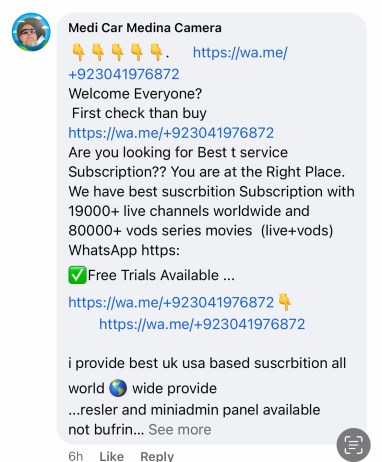
Facebook has long had a huge bot and spam problem. It’s a haven for scammers of all types and Meta seems unable to do much of anything about it. On my Facebook page I frequently get spammers and scammers trying to lure my viewers into their schemes. Take this most recent one for example spamming my group with an illegal IPTV service:
While I remove comments like this when I can it’s hard to keep up with them all – especially as Facebook brings in exactly $0 in revenue to my overall operation. I also report the comments but more often than not Facebook takes no action. Facebook said the post above did not “go against any of our community standards” and took no action against this user spamming pages and groups.
While this illegal IPTV service will likely not result in my account getting hacked , the next set of comments I reported surely will. What do you think happened when I reported a set of comments directing users to a fake account recovery service?
You guessed it : nothing. I will give credit to Facebook though – at least they tell you they’re doing nothing versus the black hole that is YouTube’s spam reporting feature.
The other day Mark Zuckerberg announced Meta’s plans to offer a paid verification tier to make their users pay for something Meta should have been doing all along to protect their users. This is an effort to crack down on account impersonations that also plague the service.
I have no doubt this will be a successful product offering because it’s essentially a protection racket. Individuals and businesses who depend on Meta’s services to reach people will have no choice but to pay in order to protect their accounts and followers. Meta will have even less incentive now to rid the platform of fake accounts and spammers.